Year: 2020

  • sched.mem.pin OVF deployment error workaround

    sched.mem.pin OVF deployment error workaround

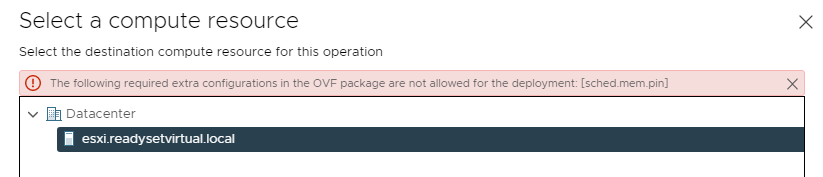
    There’s been a couple of times with a certain OVF that I have ran into this issue. Oddly enough, it happened to me in both my vSphere 6.5/6.7 and 7.0 environments and including VMware Workstation 15. I have had someone else test this and not run into the issue, however I’m not too concerned as I have found a simple work around.

    The error presents itself when the OVF/VMX file includes the below line with a value of “TRUE” set.

    vmw:ExtraConfig ovf:required="true" vmw:key="sched.mem.pin" vmw:value="true"

    What this is setting is the reservation on the memory. Even though there may not be a value set and may be set to 0MB, this can still affect the deployment.

    Now you could easily go into the file and adjust it to “false”, however you would then need to resign the OVF file and it just gets fiddly from there. So the workaround is a simple one.

    All you need to do is to deploy the OVF direct on a host. Simple!


    As for VMware Workstation. I am yet to work this one out, but if anyone has a solution, that would be great!

  • Let’s Zoom to SFD20

    Let’s Zoom to SFD20

    It’s that time again that I prepare myself for another action packed week with the team at another Storage Field Day. This time we will be passing up the flights and instead of meeting in hotel and vendor conference rooms, we will be meeting virtually with our presenting vendors.

    We have a number of vendors who will be coming along to present throughout the 3 days. As we are now joining virtually, this does present some new challenges as a number of us are joining from our home countries which are across a number of different timezones. I will be joining the calls from 1am local time, until 7am.

    Below you will find the timetable for the week, along with the presenting companies. You can also find this table on their SFD20 page at techfieldday.com. as well as the stream during the event.  All videos will posted online after the event.

    Wednesday, Aug 5 8:00-10:00 Pensando Presents at Storage Field Day 20
    Wednesday, Aug 5 11:00-12:00 Cisco Presents NVMe Transport at Storage Field Day 20
    Thursday, Aug 6 8:00-9:00 Qumulo Presents at Storage Field Day 20
    Thursday, Aug 6 10:00-12:00 Nebulon Presents at Storage Field Day 20
    Presenters: Andy Roberts, Clint Wyckoff, Josh Price, Michael Heyeck, Siamak Nazari
    Thursday, Aug 6 13:00-14:00 Intel Presents at Storage Field Day 20
    Friday, Aug 7 8:00-9:30 VAST Data Presents at Storage Field Day 20
    Presenters: Howard Marks, Jeff Denworth, Renen Hallak
    Friday, Aug 7 11:00-13:00 Pure Storage Presents at Storage Field Day 20
    All dates and times listed are local time in Silicon Valley, US/Pacific..

    As always, I am looking forward to this event as I will be able to hear about some new technology, what some vendors are up to these days, and last but not least, make new friends along the way.   If you can join us on the stream, or via twitter using the hashtag #SFD20 – make sure you say “Hi”

  • My Microsoft Build Release Previews

    My Microsoft Build Release Previews

    This post may come as a bit of a surprise to some of you who have seen my focus mostly on Storage, Backup and VMware products, but the world is a bigger place and there are technologies out there that are evolving and my interests have done a complete 360 back to my earlier days.

    This past week, we have seen the Microsoft Build conference take place streaming hundreds of sessions live from the presenter’s own home. For me, this has been a great opportunity for technologist to be able to be part of a conference they may not have been able to attend previously. I know for myself, I would not have spent the money previously to attend in-person, but that has more than likely changed now that I have had a a front row seat into the benefit of these sessions and what they have opened my eyes up to.  For the past couple of months, I’ve been thinking about moving back into the Microsoft space, I’ve spent the last 6 years focused on virtual infrastructure and less on guest OS. I’ve been dabbling in Linux for a little, but I am heavily focused on using MacOS as I’ve found Windows to be a bit too restrictive, that was until Microsoft started releasing some new exciting applications that have made a world of a difference to me and I feel have created a much more inclusive ecosystem. I use Windows 10 in the office, but any other time I will use my MacBook Pro. Since Microsoft brought out WSL, I have been using Ubuntu for all my SSH sessions and doing general command line web operations. Prior to this, I would pull out my MacBook or fire up a Linux VM.

    At Microsoft Build, there have been a number of new applications that have been released for preview that I am excited to see. The ones I am going to mention in this post are what I have found will help me in my day-to-day or just handy to have. There are many more out there, but here is my shortlist.


    1. Windows Terminal
      Here we find what looks like a standard Powershell window, but alas, it has much greater functionality that just running a couple of one-liners or scripts, by default, there are several preconfigured command line tools available, but you can also edit the settings via it’s config file and add more applications to keep them all in one spot. Windows Terminal may only be command lines, but it’s the way you set it up and use it, that’s what makes it so powerful. Windows Terminal is now 1.0

      WIndows Terminal 1.0

      Windows Terminal Config
    2. PowerToysThis has been a very welcomed addition, although still in preview, PowerToys adds extra tools to be able to customise and manipulate files, and customise your workspace with FancyZones.
      FancyZones allows you for create layouts for applications and have them snap to certain areas of your desktop to create a useable workflow for our day to day activities. You can use the templates already provided or create your own layout. There are multiple colour options to show which zone is currently active and which others are inactive.

      PowerToys FancyZones Options
      PowerToys FancyZones Templates

      The next 2 PowerToys will eliminate the need for 3rd party applications to be able to do bulk file renames and also image resizing. Don’t you hate I when you take a new set of photos for an event and they are all need something like “img_xxx”? – Well now you no longer need to either sit there renaming one by one or running through a 3rd party tool. PowerToys brings with it a simple File Renaming feature “PowerRename” that can be pinned to your explorer menu, allowing you to easily select your files, right click and Rename Files. The tool uses a “Find and Replace” method, so you can save time and only rename certain words, if needed.

      The Image Resizer works in a similar to the File Renamer. In the settings, you can create your presets for your image sizes and then you just select your images, right click and choose the Image Resizer. You are then presented with a window to select the size you would like all your select images to be.

      PowerToys PowerRename
      Image Resizer

      Image Resizer Settings
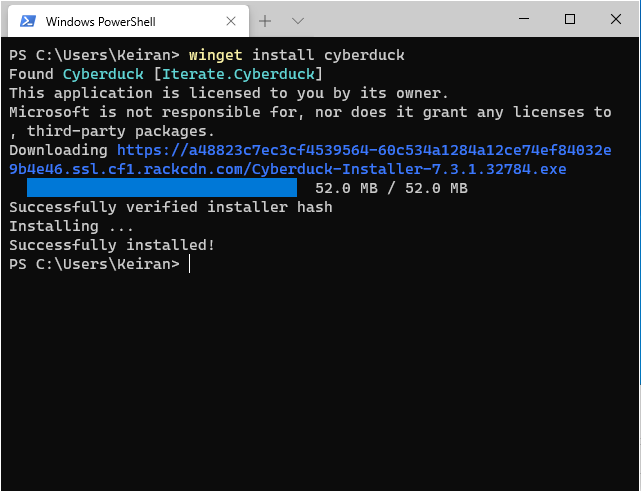
    3. Windows Package ManagerIf you have ever used Linux, whether it be Red Hat or Debian variants, you should be well aware of the yum (dnf) or apt package managers (some others exist for other distributions). Microsoft are now adding yet another feature to Windows to be able to move more inline with the evolving community and have release their new Windows Package Manager. Currently also in preview, it allows you to install recent releases of Windows applications through the commend line using winget.  Simple commands such as winget install and winget show will allow you to find and install available applications.  The winget show command will list the applications and their most recent version available. Once the application has been installed via the package manager, you will then be able to use it as any other application installed from an executable or msi file.
      winget install

      winget show


    Microsoft has certainly shown that they are listening to what users want, and are learning what people need to be able to operate in their day jobs. Previously, we needed tools such as putty to connect to SSH sessions, but with Terminals and WSL2, we are now able to connect with all in one tools from one operating system. I am excited to see what else is out there coming from Microsoft and where they roadmap is heading. If you missed any Microsoft Build sessions, you can head over and watch them on-demand.

  • Introducing vSphere Lifecycle Manager -vSphere 7

    Introducing vSphere Lifecycle Manager -vSphere 7

    On Thursday we saw VMware release their next major release in the vSphere product line. vSphere 7 was finally GA’d after a number of months since Project Tanzu and Project Pacific were announced at VMworld US 2019. There have been some significant changes in this release where some items have been removed and a large number of new features added.

    In this particular article, I want to cover the changes made to vSphere Update Manager (VUM) or as it is now known as vSphere Lifecycle Manager (vLCM). vLCM incorporates vboth the original vSphere Update Manager controls as well as managing firmware updates for your hosts hardware.

    vLCM is designed to not only apply the standard upgrades, patches, VMware Tools and Virtual Machine hardware updates as the previous vSphere Update Manager, but it is also has the ability to apply firmware updates to your hosts hardware. These new features to apply OEM software updates to your host hardware are only available to hosts running ESXi 7.0. Actions such as host patching, updates and upgrades are still available for lower versions 6.5 and 6.7. When using an ISO through vLCM to upgrade your hosts, you will still only be able to use the matching major version of vCenter, will not be able to use a lower version to say upgrade a 6.5 host to 6.7 while using vCenter 7.

    vSphere Lifecycle Manager is only available under the HTML5 vSphere client, and rightly so as the flash client has been completely removed. There are 5 top menu items and each with related sub-menu’s underneath. These are arranged as below:

    • Image Depot
      o ESXi Versions
      o Vendor Addons
      o Components
    •  Updates
    • Imported iSOs
    • Baselines
    • Settings

    Image Depot
    The image depot displays 3 sets of tables, each presenting a list of items that together will help form your remediate image to manage your host updates. You will start with your Base VMware ESXi Image, then you can either select to use updated firmware bundles provided by the vendor or select individual components to update. The vLCM will sync with the the VMware HCL to provide an up-to-date approved list of firmware.

    ESXi Versions
    This is a collective list of VMware base images that are available in the depot. Selecting the image will provide information on the included software and drives that are available and may be installed when the host if remediated.

    Vendor Addons
    In this list, you will find a collection of component updates in a single bundle provided by the vendor. Here you will get a select list which the vendor has approved to work together and information provided on each update. There is also an included list of the drivers that have also been removed from the build.

    Components
    This menu provides a list of available individual component firmware updates that you can include in your remediation images. If you have found that you do not want certain components updated in the vendor addons or that there is a critical fix that is only required for one component, then you will be able to add these components separately to your image.

    Outside of the new Image Deport, there are the standard vSphere Update Manager options avialble to remediate your hosts with the standard Patches, VMware Tools, VM Hardware Version through the use of baselines and baseline groups.

    The introduction of the new Image Depot included in vSphere Lifecycle Manager definitely seems to look promising and is a nice addition. This will certainly help save a lot of time researching and bridging the gap between ESXi and supported vendor drivers and firmware versions. This is certainly a great new step forward.

  • Western Digital Presents at SFD19

    Western Digital Presents at SFD19

    Back in 2003, I built a computer with my Dad, we had put an 80GB hard disk into it, and I certainly remember thinking I would never utilise the full capacity of the drive. About a year later, I started to attend LAN parties and in no time, I had a couple of more drive installed in the computer. What I didn’t realise at the time was that data would grow, and it wasn’t just the computer games I played with their updates, there were movies that were getting bigger with better quality as time went on.

    In today’s world, data is growing at an exploding rate as we build more and more devices that need to be connected and that generate data. By 2023 there will be an estimated 103 Zettabytes of data created. This is a huge number, one that has been created from documents, photos\videos, social media, bank transactions, IoT devices, essentially anything that is computerised. The world of technology is growing and data is becoming quicker to be transferred between devices, which allows it to be created at higher quality, the limitations are being raised to a new level. The first images of a black hole were taken over a 5 days period from 8 radio telescopes, this generated 4.5 Petabytes of data, this was just to create one image.

    Western Digital is working hard to help keep up with the rapid rate of data growth. They are a leading company that carries an amazing portfolio of decades of storage development. They hold over 14 thousand active patents on their technology and have a large global team that listen to their customers and continuously evolve.

    At Storage Field Day 19, we heard from a number of presenters from Western Digital talk about how them and their products are evolving with the demand for faster and more reliable data storage as well as better security.

    After 50 years building out storage products from spinning disks to micro SD cards through to enterprise NVMe-OF Storage platforms, Western Digital has the history and the expertise to develop far greater technology while keeping up with the demands of the ever growing global data rate.

    Thank you to Western Digital for presenting at SFD19.


  • First Steps to Tackling my Anxiety.

    On Tuesday, prior to the kick off for Storage Field Day, I was invited along with Arjan Timmerman and Chin-Fah Heoh to Pure Storage to record an episode of The On Premise IT Roundtable podcast with Pure Storage’s Brian Gold. It was a privilege to have been asked along to be part of the conversation.

    When this year started, I wrote my 3 goals, and one of them carried on from last year. it was to help beat my anxiety with public speaking. Since Joining the TechFieldDay crew, I have used this as an opportunity to step out of my comfort zone. IN 2018, I attended my first Field Day at SFD16 and walking into the room when I arrive in Boston, I did not know anyone. In this instance I told myself that I had just flew 20 hrs to attend this and I need to suck it up and go shake someone’s hand and start a conversation. That was the very first step. Along the next few days I kept meeting new people, however when I asked a question during the presentations, my heart started racing and I started to sweat.

    Come TFD18 in Feb, 2019. it was a similar situation where I felt I needed to take the next step in tackling my anxiety, and there was an opportunity to do an ignite presentation, unfortunately, I really felt I wasn’t prepared and didn’t raise my hand to do one. That chance to present was a missed opportunity, I look back and think about the step backwards I took and how I did not help my situation.

    In June 2019, I was asked to be on Nerd Journey Podcast to discuss a topic I wrote about a couple of years prior, All of a sudden, I felt like I couldn’t do it, but I wrote an email back say “Yes, I’d be glad to.” because I knew that if I sat on it, then I would never do it. During the lead up I took time to prepare for the podcast, I wrote several pages of notes about the topic and about myself. The lead up on the day of the recording, I was feeling ok, I had thoughts running through my head, but I was relatively calm, when I first spoke with John and Nick prior to recording, I felt good, until the record button was pressed. This was the point where my heart rate increased and my head went blank, even though I had my notes in front of me, I not once looked at them,. I completely forgot they were there as I was trying to focus on the question. I did not feel as though it went well. I listened back to the recording to suggest some edits where I thought I might have said too much about a particular topic, or thought it wasn’t a clear answer. it was hard to listen to myself speak, it isn’t something I like to hear and I felt that I was not good at it.

    I have since reflected on that experience and I still recognise what went wrong for me. However, I know I have since been able to accept that I won’t ever get it right the first time, it always requires practice and lots of it. So when I was asked to do the On Premise IT Roundtable podcast, I immediately said, “Yes.” and then regretted it after as I start to fret saying “I don’t know how I’m going to have anything to say about that topic.” “I’m going to freeze and not have a single thing to say.”  – but it was actually not like that in the end.

    It was yet another interesting experience for me. While we were given a very high level premise, there was no specific topic, as that was yet to be chosen. I started to over-think that I probably wouldn’t have anything much to contribute, or not to the depth that would be required. When we came to recording the podcast, the topic that was chosen was something I had an extremely high-level view of and next to no technical knowledge of, mostly due to never requiring the use. At this point, I started to freak out with just thoughts running through my head, even to the point that by just introducing myself, my heart was pounding so much that I was trying to see if my mic was picking it up. As the conversation moved along, I started to feel more calm, it wasn’t as bad as I thought it would be. I still didn’t say a lot, and certainly not much from a technical perspective.

    In the end, I was very glad I did take the opportunity to join the podcast and record as I am now able to reflect and apply the practice into the week ahead for SFD19. In fact, I have now also been invited to talk on another podcast during the week with 2 other SFD delegates and of course I said, “Yes.” I may still feel like I’ve made a terrible decision and that I don’t want to do it, but deep down I want to be able to sit down and be able to control my anxiety so that I can be confident in presentations and podcasts. This is why I love Tech Field Day, I am learning more about myself and pushing my comfort zone over the edge.  It takes practice and letting go of those fears, but as I’ve learnt, saying, “Yes.” is the first step in achieving your goals.

    Check out the Storage Field Day 19 schedule and join us for a week of in-depth discussions around storage.